
XCIPTV Player
Free IPTV player with multiscreen, DVR recording, parental controls, catch-up TV, and full EPG. Available on Google Play Store for Android and Google TV.
- What is XCIPTV Player?
- Requirements Before Starting
- Step 1: Download and Install XCIPTV
- Step 2: Add Your IPTV Service (Xtream Codes)
- Step 3: Add via M3U URL (Alternative)
- Step 4: Navigate the XCIPTV Interface
- Step 5: Configure EPG (Program Guide)
- Step 6: Enable Multiscreen View
- Step 7: Set Up Parental Controls
- Step 8: Record Live TV (DVR)
- Troubleshooting Common Issues
- Frequently Asked Questions
What is XCIPTV Player?
XCIPTV Player is a free, feature-rich IPTV application developed by Nath Network, available on the Google Play Store. It is designed for Android phones, Android tablets, Google TV (Chromecast with Google TV), Android TV boxes, and can be sideloaded on Amazon Firestick and Fire TV. Unlike many IPTV players that charge for premium features, XCIPTV gives you multiscreen viewing, live TV DVR recording, electronic program guide (EPG), catch-up TV, and parental controls completely free of charge.
The app supports two primary connection methods: Xtream Codes API (recommended for the best experience with automatic EPG and channel categories) and M3U playlist URL (for providers who supply a direct M3U link). XCIPTV pairs perfectly with a Jhakas Stream Now subscription, giving you access to 13,000+ live channels in HD and 4K across all your Android devices.
XCIPTV is the player only. It does not supply any channels or content. You need an active IPTV subscription. Jhakas Stream Now provides 13,000+ channels in HD and 4K that work perfectly with XCIPTV.
Get Your IPTV SubscriptionFrom $10/month. Free 24-hour trial. No credit card required. Instant activation.
How XCIPTV Compares to Other Free IPTV Players
| Feature | XCIPTV | IPTV Smarters | Televizo | TiviMate |
|---|---|---|---|---|
| Price | 100% Free | Free | Free / Premium | Free / Premium |
| Multiscreen (4 streams) | Yes | No | No | Yes (Premium) |
| Live DVR Recording | Yes | No | No | Yes (Premium) |
| Parental Controls (PIN) | Yes | Basic | No | Yes |
| Catch-Up TV | Yes | Yes | Limited | Yes |
| Full EPG Guide | Yes | Yes | Yes | Yes |
| Google Play Store | Yes | Yes | Yes | Yes |
| Xtream Codes API | Yes | Yes | Yes | Yes |
Requirements Before Starting
Have the following ready before you begin the XCIPTV setup:
- Compatible device: Android phone or tablet (Android 5.0+), Google TV (Chromecast with Google TV), Android TV box, or Amazon Firestick
- IPTV subscription credentials from Jhakas Stream Now:
- Server URL in the format
http://server.com:port - Username (your unique account login)
- Password (your account password)
- Server URL in the format
- Internet connection: Minimum 10 Mbps for HD, 25 Mbps for 4K streaming
- Storage space: At least 50 MB free (more if you plan to use DVR recording)
Your Jhakas Stream Now credentials are sent to you on WhatsApp immediately after your subscription is activated. If you have not subscribed yet, tap the WhatsApp button above to get a free 24-hour trial first.
1 Download and Install XCIPTV
Android Phones, Tablets, Google TV and Android TV (Google Play Store)
Because XCIPTV is available on the Google Play Store, installation on any Play Store-enabled device takes under a minute:
- Open the Google Play Store on your device
- Tap the search bar and type XCIPTV or XCIPTV Player
- Select the app by Nath Network from the results (look for the green satellite icon)
- Tap Install and wait for the download to complete
- Tap Open once installation finishes
Google TV tip: On Chromecast with Google TV, press the voice search button and say "XCIPTV" to find the app instantly without typing. Then install it the same way you would on any Android device.
Amazon Firestick and Fire TV (Sideload via Downloader)
XCIPTV is not available in the Amazon Appstore, so you need to sideload it using the Downloader app. This is a simple one-time process:
Go to Settings on your Firestick. Select My Fire TV (or Device). Tap Developer Options. Toggle on Apps from Unknown Sources and ADB Debugging.
Search for Downloader in the Amazon Appstore and install it. This is the official sideloading tool for Firestick, fully safe and endorsed by Amazon.
Open Downloader, tap the URL field and enter the code below. Downloader will fetch the official XCIPTV APK automatically.
Once the APK downloads, tap Install when prompted. After installation tap Open to launch XCIPTV, or Done and find it in your apps list.
Security note: Only use the official Downloader code above (2896485) or download directly from the Google Play Store. Avoid third-party APK sites that may distribute modified versions with malware.
2 Add Your IPTV Service via Xtream Codes Recommended
Xtream Codes API is the best method for connecting XCIPTV to your Jhakas Stream Now subscription. It automatically loads your channel list, VOD library, catch-up TV, and EPG data with a single login.
- Open XCIPTV Player on your device
- On the home screen tap Add Playlist or the + (plus) icon
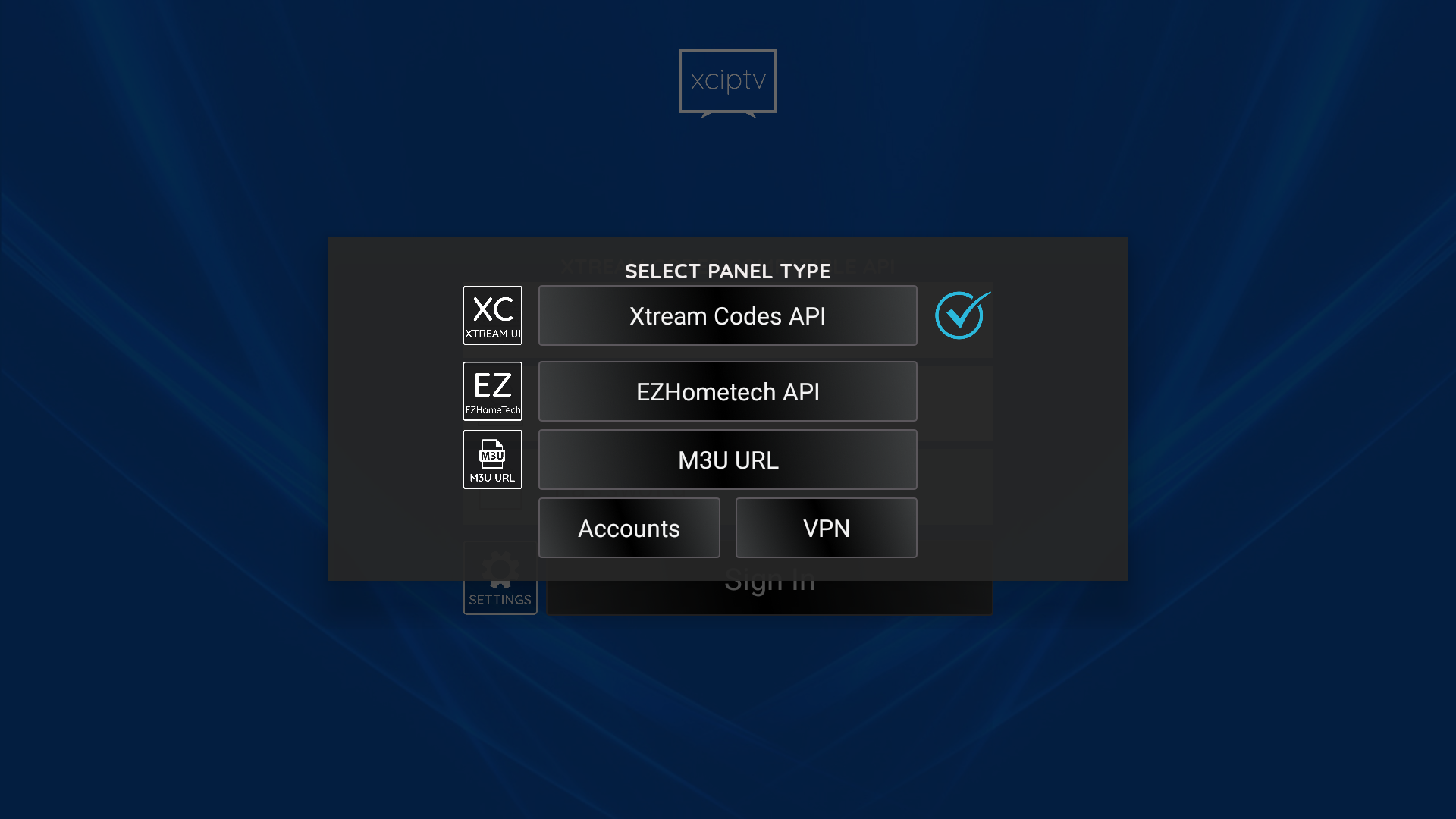
- From the connection type options, select Xtream Codes API
- Fill in the three fields:
- Server URL: Paste the full address from your Jhakas Stream Now credentials (e.g.
http://yourserver.com:8080) - Username: Your subscription username exactly as provided
- Password: Your subscription password
- Server URL: Paste the full address from your Jhakas Stream Now credentials (e.g.
- Give your playlist a name such as Jhakas Stream
- Tap Login or Add to connect
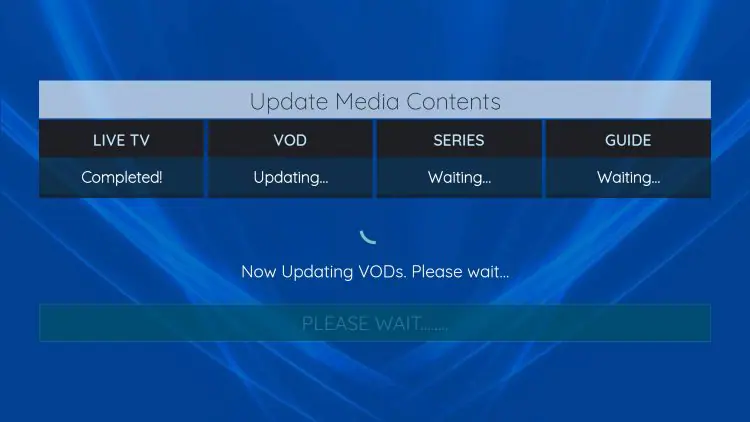
- Wait for XCIPTV to load your channels (30 seconds to 2 minutes depending on your connection speed)
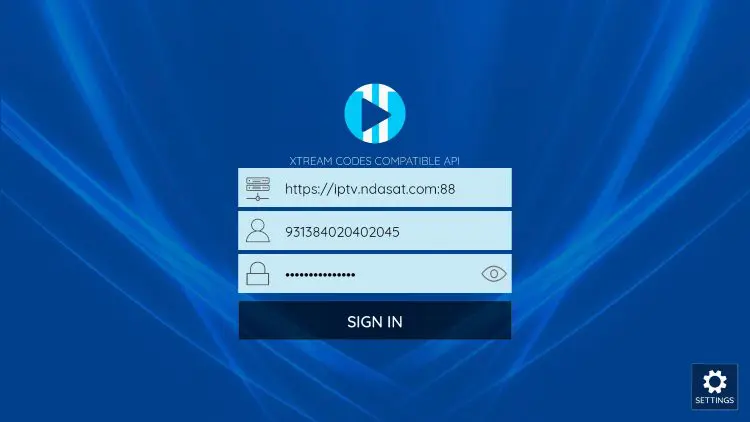
Tip: Copy and paste your Server URL, username, and password directly from the WhatsApp message you received from Jhakas Stream Now. A single character error in the URL will cause a login failure.
3 Add via M3U URL (Alternative Method)
If your provider gave you an M3U playlist URL instead of Xtream Codes credentials, use this method:
- Open XCIPTV and tap Add Playlist
- Select M3U URL from the playlist type options
- Paste your M3U URL into the URL field
- Name your playlist and tap Add
- XCIPTV will fetch and parse the playlist, then display all available channels
M3U playlists do not auto-update the EPG the same way Xtream Codes does. You may need to manually enter an XMLTV EPG URL in Settings to get program guide data. Ask Jhakas Stream Now support for your EPG URL.
4 Navigating the XCIPTV Interface
Once your playlist is loaded, XCIPTV presents your content in a clean, category-based layout:
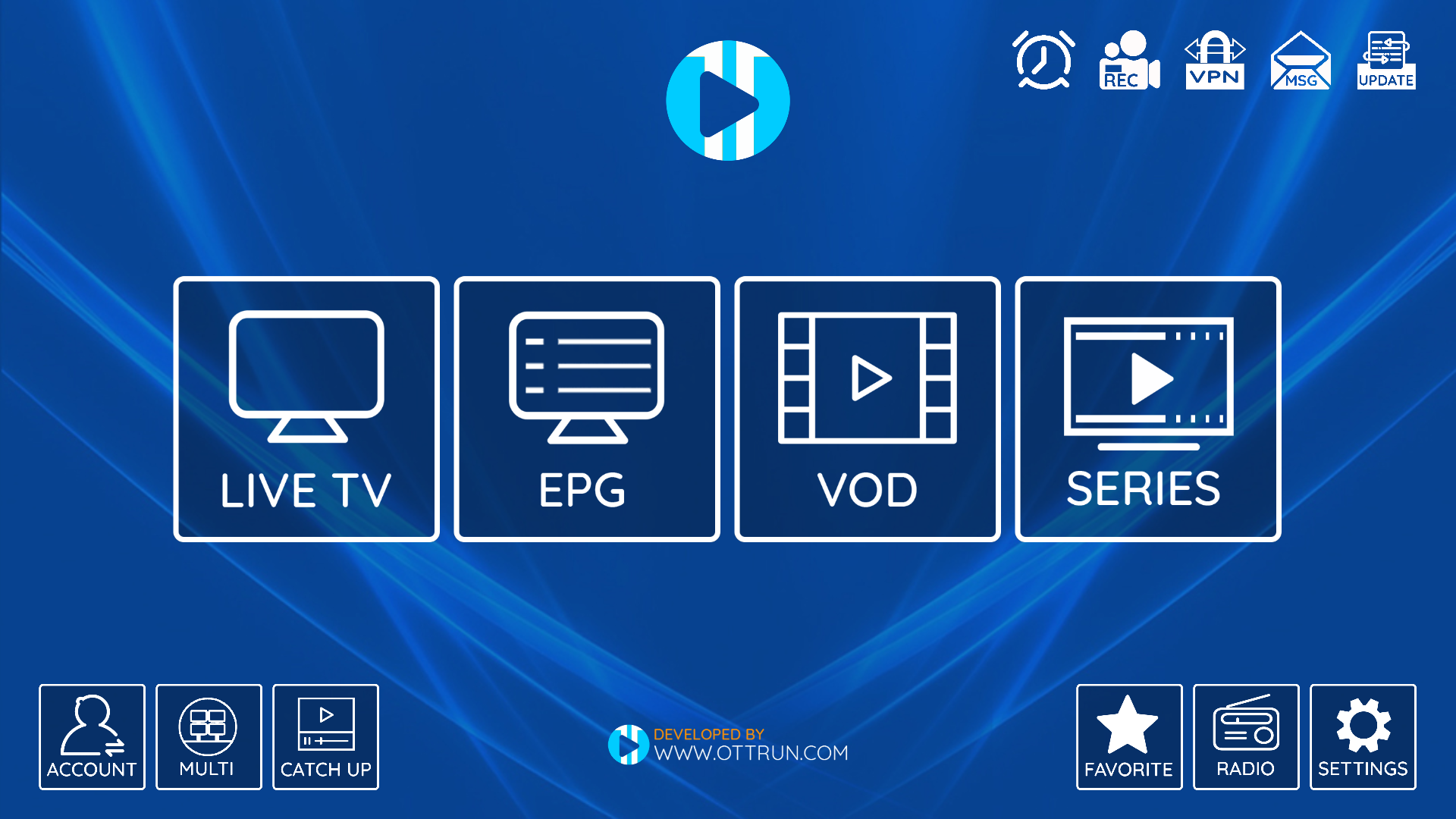
- Live TV: All live channels organised into your provider's categories (Sports, Entertainment, News, Kids, Indian, Arabic, international and more)
- Movies (VOD): On-demand movies from your subscription library, if included
- Series: TV show series libraries with seasons and episodes, if included
- Catch-Up TV: Watch channels from the past 7 days on demand, if your Jhakas Stream Now plan includes it
- Favourites: Channels you have starred for quick access
- Search: Find any channel by name instantly using the search function
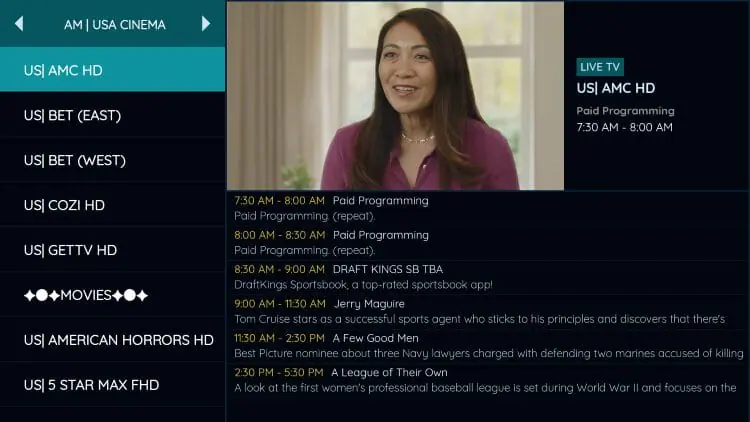
- EPG / Program Guide: View what is currently on and what is coming up on each channel
To watch a channel, simply tap on it. The player will open in full screen. Tap the screen once to show the player controls (play, pause, next channel, multiscreen, settings).
5 Configure EPG (Electronic Program Guide)
The EPG is your digital TV guide inside XCIPTV. It shows you what is on now, what is coming up next, and lets you schedule recordings directly from the guide. When using Xtream Codes API, the EPG is usually loaded automatically. If it does not appear, follow these steps:
- Tap the Settings icon (gear icon) from the XCIPTV home screen or menu
- Select Playlist Settings or tap your playlist name
- Find the EPG URL or XMLTV Source field
- Paste your XMLTV EPG URL from your Jhakas Stream Now credentials
- Set the EPG update interval to every 12 hours for accurate data
- Tap Save then Update EPG to download the program guide
- Wait 1 to 3 minutes while XCIPTV downloads and processes the EPG data
Time zone matters: Ensure your device's date, time, and time zone are set correctly. Incorrect time zone settings cause the EPG to show programme times shifted by several hours compared to the actual broadcast.
6 Enable Multiscreen View (Watch 4 Channels at Once)
One of XCIPTV's standout free features is the ability to watch up to 4 live channels simultaneously on a single screen. This is perfect for sports fans who want to monitor multiple matches at the same time, or households watching different content at once on a big screen TV.
- Start playing any channel in full screen mode
- Tap the screen once to reveal the player toolbar
- Tap the Multiscreen icon (looks like a grid of small rectangles) in the toolbar
- XCIPTV will switch to a split-screen grid view
- Tap each empty panel and select the additional channel you want in that slot
- To make one stream full screen temporarily, tap on it once
- To exit multiscreen, tap the full-screen icon or use the back button
Best used on TV: Multiscreen mode works on any device but is most enjoyable on Android TV or Google TV connected to a large screen. Use a wireless keyboard or the TV remote's D-pad to navigate between panels.
7 Set Up Parental Controls
XCIPTV includes PIN-protected parental controls that allow you to restrict access to specific channels or content categories. This is useful for households with children.
- Open XCIPTV and tap the Settings icon
- Navigate to Parental Controls or Parental
- Tap Set PIN and create a 4-digit PIN code
- Confirm your PIN
- Under Restricted Categories, tick the channel categories you want to lock (for example: Adult, 18+, or any other category)
- You can also lock individual channels from their channel options
- Save your settings. Locked content will now require your PIN before it can be accessed
Remember your PIN: There is no PIN recovery option inside the app. If you forget your parental control PIN, you will need to clear the XCIPTV app data in Android Settings to reset it, which also removes your playlists.
8 Record Live TV with XCIPTV DVR
XCIPTV includes a built-in live TV recording (DVR) feature, letting you record channels to your device's internal or external storage. This feature is completely free and does not require a separate subscription or premium upgrade.
How to Record a Channel Now
- Start playing the channel you want to record
- Tap the screen to reveal the player toolbar
- Tap the Record button (circle/dot icon) to start recording immediately
- A recording indicator will appear on screen
- Tap the Record button again to stop the recording
- Find your recordings in the XCIPTV Recordings section or in your device's storage folder
How to Schedule a Recording from EPG
- Open the EPG / Program Guide view in XCIPTV
- Browse to the programme you want to record
- Tap on the programme title to see its details
- Tap Record or the record icon to schedule it
- XCIPTV will automatically start and stop the recording at the correct times
Storage tip: A 1-hour HD recording takes approximately 1.5 to 3 GB of storage. Make sure you have sufficient free storage on your device or an external USB drive (on Android TV boxes) before scheduling long recordings.
Troubleshooting Common XCIPTV Issues
XCIPTV Login Failed or Cannot Connect
- Double-check all three fields: Server URL, username, and password. Look for extra spaces or missing characters
- Ensure the Server URL starts with
http://orhttps://and includes the port number (e.g.:8080) - Test your internet connection by opening a website in your browser
- Confirm your Jhakas Stream Now subscription is active by messaging us on WhatsApp
- Try switching from Wi-Fi to mobile data (or vice versa) to rule out a network issue
XCIPTV EPG Not Showing or Empty
- Go to Settings and verify that an EPG URL is entered in the playlist settings
- Tap Update EPG manually and wait 2 to 3 minutes
- Check that your device's date, time, and time zone are all correct (Settings > General > Date and Time)
- Try deleting your playlist and re-adding it using the Xtream Codes method, which auto-pulls EPG
- Contact Jhakas Stream Now on WhatsApp to confirm the correct EPG URL for your account
Buffering and Freezing During Playback
- Run a speed test. You need at least 10 Mbps for HD and 25 Mbps for 4K
- Move your device closer to your Wi-Fi router, or connect via Ethernet cable on a TV box
- Close background apps consuming bandwidth or processor resources
- In XCIPTV player settings, try reducing the buffer size or switching the decoder from hardware to software
- Try a different channel to confirm whether the issue is with one specific channel or all channels
XCIPTV Channels Not Loading After Update
After a major app update, XCIPTV may require you to log in again. Go to your playlist settings, remove the old connection, and re-add it using your Xtream Codes credentials. Your credentials have not changed.
Firestick: XCIPTV App Not Found
XCIPTV is not in the Amazon Appstore. You must sideload it using the Downloader app and the code 2896485 as described in Step 1 above. Make sure Apps from Unknown Sources is enabled in your Firestick Developer Options.
Still having issues? Jhakas Stream Now's support team is available 24/7 on WhatsApp. We will walk you through the XCIPTV setup step by step for your specific device and internet connection.
Frequently Asked Questions about XCIPTV
Was this XCIPTV guide helpful?
Your feedback helps us improve our setup articles.